
Cronosurf Soccer Pro2.3.0 - Google Play
You'll be able to see results in few seconds.
Publisher Description
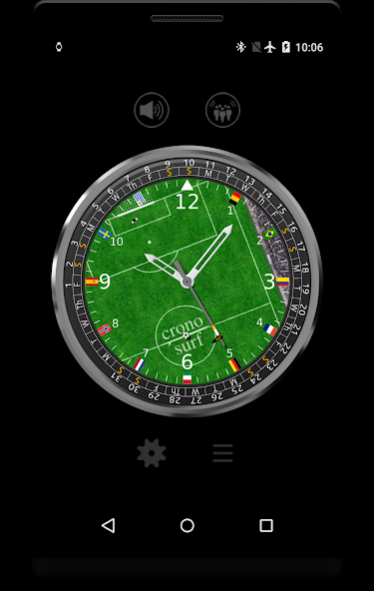


is made for soccer fans and everyone that likes unusual watches! Based on Cronosurf Breeze, it nicely shows a soccer play field and even lets you kick the ball with the second-hand! There is even a goal and a goal keeper - and yes, you can score goals!
Enjoy all the lovingly created graphics, animation and sound effects. Show it to your friends and challenge them to score a goal in a shorter time than you. Play watch soccer today!
Key features
• Android Wear supported - play directly on your Wear watch!
• Reverse kick
• Current date and day of the week with the unique Cronosurf
Monthly Calendar
• Continuous indication on date field (serves as an AM/PM indicator)
• Analog battery indicator (optional)
• Keep-screen-on timer for 5 minutes (specially useful for Smartwatches)
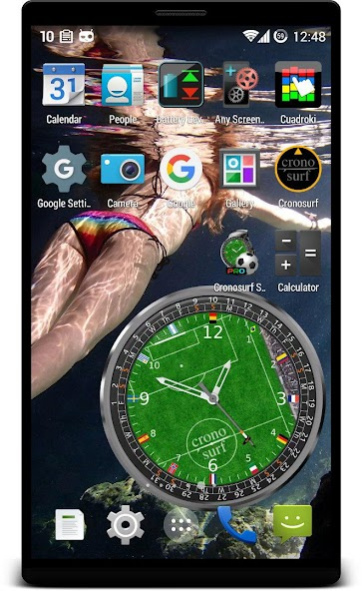
• Live Wallpaper with adjustable size and position of the watch. (The standard procedure to enable it: long-press on a free area of your home screen and select "Live Wallpapers".)
• It can run over the screen lock
PRO version features included in this app
• Ad-free
• 5 customizable color presets
• **NEW** Goal counter
• **NEW** The info box on Wear now shows the watch temperature
• Option: National flags on the hour markers - after each goal they rotate by one notch
• Landscape mode support
• For the Live Wallpaper, any image from the gallery can be set as a background image
To find out more about Cronosurf, visit
http://cronosurf.com
About Cronosurf Soccer Pro
The company that develops Cronosurf Soccer Pro is fruit4droid. The latest version released by its developer is 2.3.0.
To install Cronosurf Soccer Pro on your Android device, just click the green Continue To App button above to start the installation process. The app is listed on our website since 2019-08-19 and was downloaded 0 times. We have already checked if the download link is safe, however for your own protection we recommend that you scan the downloaded app with your antivirus. Your antivirus may detect the Cronosurf Soccer Pro as malware as malware if the download link to com.fruit4droid.cronosurfsoccer.pro is broken.
How to install Cronosurf Soccer Pro on your Android device:
- Click on the Continue To App button on our website. This will redirect you to Google Play.
- Once the Cronosurf Soccer Pro is shown in the Google Play listing of your Android device, you can start its download and installation. Tap on the Install button located below the search bar and to the right of the app icon.
- A pop-up window with the permissions required by Cronosurf Soccer Pro will be shown. Click on Accept to continue the process.
- Cronosurf Soccer Pro will be downloaded onto your device, displaying a progress. Once the download completes, the installation will start and you'll get a notification after the installation is finished.
Program Details
System requirements
Download information
Pricing
Version History
version 2.3.0
posted on 2019-08-19
v 2.3
- 64-bit native support
- General update to newer libraries and small bug fixes
version 2.1
posted on 2016-07-12
v 2.1,- The battery indication now also appears on the Live Wallpaper,- Some minor bugs fixed,v 2.0,- Support for Android Wear watches added,- New hour and minute hand design
Disclaimer
Official Google Play Link
We do not host Cronosurf Soccer Pro on our servers. We did not scan it for viruses, adware, spyware or other type of malware. This app is hosted by Google and passed their terms and conditions to be listed there. We recommend caution when installing it.
The Google Play link for Cronosurf Soccer Pro is provided to you by apps112.com without any warranties, representations or guarantees of any kind, so access it at your own risk.
If you have questions regarding this particular app contact the publisher directly. For questions about the functionalities of apps112.com contact us.
